

Introduction
Most teams know they need better documentation, but documentation is usually the task that gets pushed to the end of the list. Workflows live inside chat threads, video calls, email chains, spreadsheets, and the memory of experienced employees. When a new hire joins, a manager has to explain the same process again. When someone leaves the company, a key task may suddenly become harder to complete. When a customer issue appears, support agents may handle it in different ways because there is no shared process to follow.
This is where a practical AI SOP Generator can help. Instead of asking a busy employee to write a standard operating procedure from a blank page, an AI documentation tool can turn rough notes, workflow descriptions, recordings, or checklists into a structured draft. The team can then review the output, correct the details, and publish a clear SOP that people can actually use.
The goal is not to create paperwork for its own sake. The goal is to make work easier to repeat, easier to train, and easier to improve. For business owners, startup teams, operations managers, HR teams, project managers, and customer support departments, faster SOP creation can remove a major bottleneck from day-to-day operations.
What Is an AI SOP Generator?
An AI SOP Generator is software that uses artificial intelligence to help create standard operating procedures. A standard operating procedure is a step-by-step document that explains how a specific process should be completed. It may describe who is responsible, what tools are required, what order the steps should follow, what quality checks are needed, and what to do when an exception appears.
In simple terms, an AI SOP Generator takes unstructured process knowledge and turns it into structured documentation. You might give the tool a short description such as, "When a customer requests a refund, the support agent checks the account, confirms eligibility, processes the refund, updates the CRM, and sends a confirmation email." The AI can then organize that information into a draft SOP with a purpose, scope, required tools, roles, procedure steps, review points, and optional examples.
This type of SOP software is especially useful because most teams do not struggle with knowing the process. They struggle with writing it clearly. The knowledge already exists, but it is scattered. AI helps collect and shape that knowledge into a format that is easier to edit, share, and maintain.
Why Standard Operating Procedures Matter
Standard operating procedures matter because growing teams need consistency. When a company is small, informal explanations may work for a while. A founder can answer questions directly. A senior employee can show a new teammate how to complete a task. But as the team grows, this approach becomes slow and unreliable.
Good SOPs support documentation by giving teams a single source of truth. Instead of searching old messages or asking the same question repeatedly, employees can find the current process in one place.
SOPs also improve training. A new employee can learn faster when each recurring task has a clear guide. This does not remove the need for human coaching, but it makes onboarding more structured and less dependent on memory.
Consistency is another major benefit. If five support agents handle refund requests in five different ways, customers receive uneven service. A clear customer support SOP helps everyone follow the same basic process while still allowing good judgment where needed.
SOPs help with quality control as well. A process can include review checkpoints, approval steps, required fields, and common mistakes to watch for. This reduces rework and prevents small errors from becoming bigger operational problems.
Finally, SOPs improve productivity. When instructions are clear, employees spend less time waiting for answers and more time completing useful work.
Common Types of SOPs
Different teams use SOPs for different workflows. The best place to start is with tasks that happen often, affect customers, involve risk, or require consistent handoffs between people.
Internal Process SOPs
Internal process SOPs document how business operations happen inside the company. These may include invoice approval, vendor onboarding, sales-to-operations handoffs, content publishing, purchase requests, meeting preparation, or monthly reporting.
For example, a marketing agency might create an internal process SOP for publishing a client blog post. The steps could include keyword research, outline approval, drafting, editing, client review, formatting, publishing, and performance tracking. With process documentation in place, the agency can deliver work more predictably and train assistants or new team members faster.
Daily Task SOPs
Daily task SOPs cover routine work that happens every day or every week. These tasks may seem simple, but they often cause delays when the responsible person is unavailable.
Examples include checking a shared inbox, updating a project board, preparing a daily operations report, reviewing open tickets, confirming appointments, or sending end-of-day summaries. A daily task SOP should be short, direct, and easy to scan.
Compliance and Policy SOPs
Compliance and policy SOPs explain how teams should follow internal rules, legal requirements, security standards, or industry expectations. These SOPs may cover data handling, employee access requests, privacy procedures, safety checks, financial approvals, or audit preparation.
These documents should be reviewed carefully by the right stakeholders. AI can help draft the structure, but compliance-related SOPs should always be verified by qualified internal leaders or external advisors when needed.
Customer Support SOPs
Customer support SOPs help agents respond consistently to common situations. These may include refund requests, technical issue escalation, account changes, billing questions, unhappy customers, bug reports, or service outage communication.
For example, a support escalation SOP might explain when to escalate an issue, what information to collect, which internal channel to use, how to update the customer, and how to close the loop after resolution.
Technical SOPs
Technical SOPs document IT, software, product, or systems-related processes. These may include password resets, backup checks, software deployment, server maintenance, bug triage, access control, or QA testing.
Technical SOPs need precision. Small missing details can create security issues, downtime, or inconsistent results. An AI SOP Generator can help create the first draft, but technical experts should review the final steps before publication.
Why Use an AI SOP Generator?
Manual SOP creation often feels slow because it requires thinking, organizing, writing, formatting, and editing at the same time. An AI SOP Generator reduces that friction by giving teams a structured starting point.
1. Saves Time
Writing an SOP from scratch can take hours, especially when the process has many steps or decision points. AI can create a first draft in minutes from a plain-language description, a checklist, or a transcript. The team still needs to review the result, but review is usually faster than starting with an empty document.
2. Reduces Manual Documentation Work
Documentation work often includes turning messy notes into a clean format. AI can help organize the content into sections such as purpose, scope, required tools, responsible roles, procedure steps, quality checks, and exceptions. This makes process documentation less intimidating for employees who are not professional writers.
3. Improves Consistency
If every team writes SOPs differently, the documentation becomes harder to use. An AI SOP Generator can help standardize the structure across departments. For example, every SOP can include the same core sections, making it easier for employees to find the information they need.
4. Helps Train New Employees
New employees need clear instructions to become productive. SOPs give them a reference they can revisit after training sessions. HR teams can use SOPs for onboarding, operations teams can use them for recurring tasks, and managers can use them to delegate work with less confusion.
5. Reduces Mistakes
Mistakes often happen when people rely on memory. A clear SOP reduces guesswork by showing the right sequence of steps. It can also include common mistakes, approval requirements, and checkpoints that prevent errors before they reach the customer.
6. Makes Knowledge Easier to Share
When knowledge lives only with one employee, the business has hidden risk. AI-assisted workflow documentation helps teams capture that knowledge and share it through a company wiki, SOP software, project management tool, or internal knowledge base.
How an AI SOP Generator Works
Most AI SOP Generator tools follow a similar process. The exact features vary, but the workflow is usually simple enough for non-technical teams.
Step 1: Choose the Process You Want to Document
Start with one specific process. Avoid broad topics such as customer support or operations. Choose something narrower, such as handling a refund request, approving a new vendor, publishing a blog post, onboarding a contractor, or escalating a technical support ticket.
A narrow process produces a better SOP because the steps, owner, tools, and outcome are easier to define.
Step 2: Record or Describe the Workflow
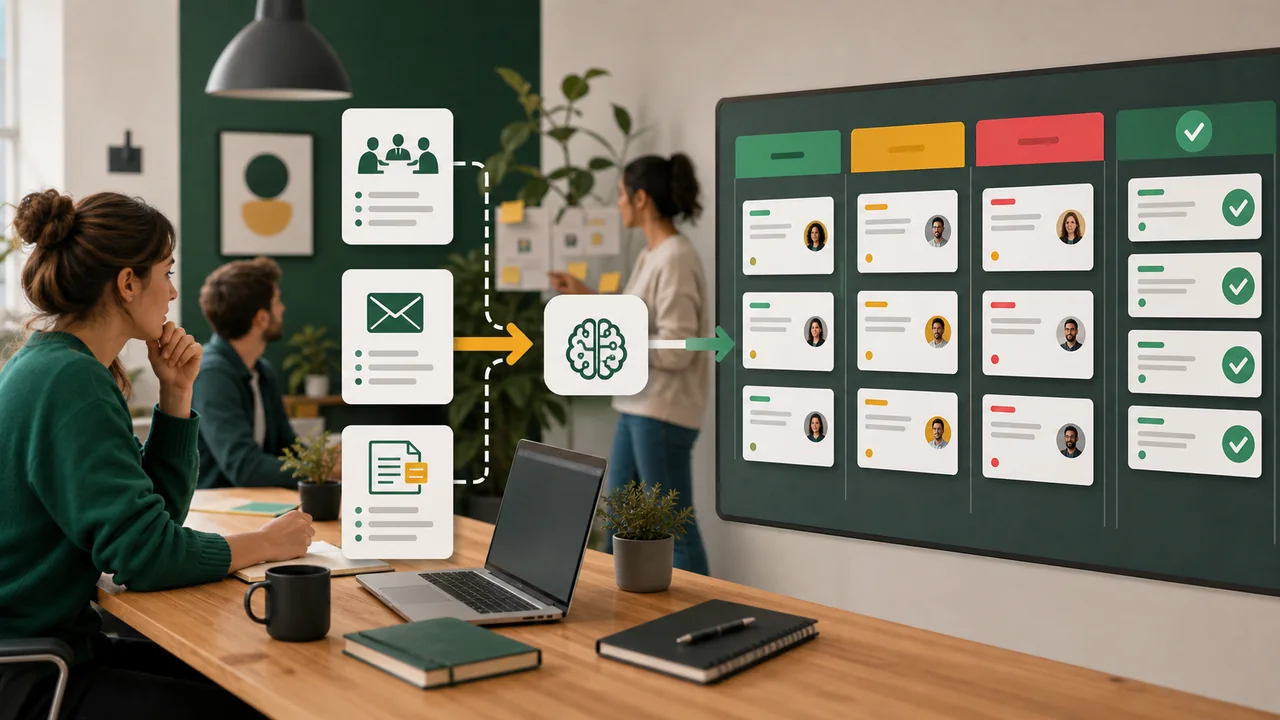
Next, collect the process information. You can type a description, paste rough notes, upload an existing checklist, summarize a screen recording, or use a transcript from an employee explaining the task.
The input does not need to be perfect. It only needs to describe what happens, who does it, what tools are used, and what the final result should be.
Step 3: Let AI Generate the SOP
The AI SOP Generator turns your input into a structured draft. It may create sections for purpose, scope, tools, roles, procedure steps, expected output, exceptions, and quality control. This first draft gives the team something concrete to improve.
Step 4: Review and Edit the Steps
Human review is essential. AI may organize information well, but the people who own the process must confirm that the SOP is accurate. Check for missing steps, unclear wording, wrong tool names, outdated approvals, or situations that need exception handling.
The best reviewers are often the employees who perform the task every week. They know the small details that managers may overlook.
Step 5: Share the SOP With Your Team
After review, store the SOP where the team can find it. This might be SOP software, a company wiki, a shared drive, Notion, Google Docs, Confluence, ClickUp, Asana, or a customer support knowledge base.
Make ownership clear. Every SOP should have a person or team responsible for keeping it updated.
Best Practices for Creating Effective SOPs
A useful SOP should be easy to follow, easy to update, and clear enough for someone who is learning the process.
Use simple language. The goal is clarity, not complexity. Avoid jargon unless the target reader already understands it.
Keep the scope focused. One SOP should explain one process. If the process is too large, split it into smaller SOPs.
Write steps in the order they happen. If there are decision points, explain what to do in each situation.
Include required tools and links. Mention the software, forms, templates, dashboards, or files needed to complete the work.
Define roles. If multiple people are involved, explain who starts the process, who approves it, who completes it, and who receives the output.
Add examples when useful. A short example can make a step easier to understand, especially for customer support responses, approval messages, or quality checks.
Set a review schedule. Processes change. A quarterly or biannual review helps keep documentation accurate.
Common Mistakes to Avoid
One common mistake is using complicated language. If the SOP reads like a legal document when it should be a task guide, employees may avoid using it.
Another mistake is skipping small steps. Experienced employees often forget details because the task feels obvious to them. New employees need those details.
Teams also forget to update SOPs. Outdated documentation can create more confusion than no documentation because it gives people the wrong instructions.
Another mistake is not involving the right people. Managers may understand the goal, but the employees who do the work often know the real workflow, including edge cases and bottlenecks.
Finally, avoid making every SOP too long. Some processes require detail, but simple daily tasks may only need a short checklist. The best SOP is detailed enough to be useful and concise enough to be followed.
Who Can Benefit From an AI SOP Generator?
Business owners can use an AI SOP Generator to reduce dependency on informal knowledge and make delegation easier.
Startup teams can document processes while they move quickly, which helps new hires understand how work gets done.
Operations managers can standardize repeatable workflows across departments and reduce unnecessary back-and-forth.
HR teams can create onboarding, offboarding, hiring, policy, and employee request SOPs faster.
Customer support teams can build consistent procedures for refunds, escalations, account changes, and common customer issues.
Project managers can document delivery workflows, approval steps, client communication standards, and reporting routines.
Agencies and freelancers can use SOPs to manage client work, train contractors, and maintain quality as workload grows.
Any team that repeats a process can benefit from better workflow documentation. AI simply makes the first version faster to create.
Conclusion
An AI SOP Generator helps teams turn scattered process knowledge into clear, usable standard operating procedures. It saves time, reduces manual documentation work, improves consistency, supports training, reduces mistakes, and makes knowledge easier to share.
The best approach is to combine AI speed with human expertise. Let the AI documentation tool create the first draft, then ask the people who know the workflow to review, edit, and approve it. Over time, this creates a practical documentation system that helps the business run with more clarity and less repeated explanation.
For growing teams, better SOPs are not just documents. They are operating assets. They help people do the right work in the right way, even as the company changes, hires, and scales.



No comments yet.
Be the first to ask a question or add a useful note.