

Why appointment scheduling is a high-ROI automation
Appointment scheduling looks simple until it starts leaking time. A customer asks for availability, someone checks the calendar, a message goes back and forth, the appointment is confirmed, then somebody sends reminders manually. If the customer cancels or misses the meeting, the process starts again.
For service businesses, clinics, consultants, agencies, local contractors, coaches, and repair companies, scheduling automation can protect revenue and reduce admin work quickly.
The best first version does not need to be complex. It should:
- Capture the appointment request.
- Identify what the customer needs.
- Offer or confirm the right booking path.
- Send reminders.
- Create internal notes.
- Trigger follow-up after the appointment.
This article builds on the broader guide to AI automation for small business. Scheduling is one of the safest places to start because the workflow is repetitive and easy to measure.
The simple scheduling workflow
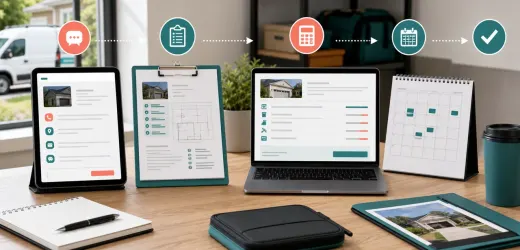
A practical appointment workflow has eight steps:
1. A customer requests an appointment.
2. The system captures the request.
3. AI summarizes the need.
4. The workflow checks the appointment type.
5. The customer receives the correct booking or confirmation message.
6. The calendar is updated.
7. Reminders are sent before the appointment.
8. A follow-up task or message is created afterward.
AI should not control every step. Use AI for understanding the request and drafting helpful messages. Use deterministic automation for calendar updates, reminders, and task creation.
Step 1: Define appointment types
Do this before touching any tool. Create a short list of appointment types:
- Discovery call.
- Estimate or quote visit.
- Paid consultation.
- Support session.
- Installation appointment.
- Follow-up appointment.
- Emergency request.
Each type should have rules:
- Duration.
- Required information.
- Staff member or team.
- Location or meeting link.
- Buffer time.
- Confirmation message.
- Follow-up action.
When appointment types are clear, the automation can route requests reliably.
Step 2: Capture the right information
Ask for only what you need. A scheduling form might include:
- Name.
- Email.
- Phone.
- Preferred date or time.
- Service needed.
- Location.
- Urgency.
- Notes.
If a customer writes a long message, AI can extract the useful details. If information is missing, AI can draft a short question instead of making assumptions.
Step 3: Use AI to summarize the request
The internal summary should be short:
```
Appointment request:
- Service needed:
- Preferred timing:
- Location:
- Urgency:
- Missing details:
- Recommended appointment type:
```
This summary helps the team understand the request without reading every message from scratch.
Step 4: Route by appointment type
Routing rules can be simple:
- Discovery calls go to sales.
- Technical support sessions go to support.
- Quote visits go to operations.
- Emergency requests alert the owner.
- Follow-ups go to the original staff member.
If the system is unsure, route to a human. Uncertainty should create a review task, not a bad booking.
Step 5: Draft confirmation messages
Use AI to draft messages that feel specific without overpromising:
```
Write a short appointment confirmation message.
Mention the service requested and the appointment time.
Include what the customer should prepare.
Do not promise price, outcome, or availability beyond the confirmed appointment.
Keep it under 100 words.
```
For a reschedule, use a similar prompt but acknowledge the change clearly.
Step 6: Add reminders
Reminders reduce no-shows. A basic schedule:
- 24 hours before: friendly reminder.
- 2 hours before: short confirmation.
- 10 minutes before online calls: meeting link reminder.
For local services, include location, parking, preparation, or access instructions if relevant.
Step 7: Create internal pre-appointment notes
Before the appointment, the team should see:
- Customer name and contact.
- Appointment type.
- Customer need.
- Previous messages.
- Any missing information.
- Suggested next step.
This makes the business feel prepared, even with a small team.
Step 8: Trigger post-appointment follow-up
After the appointment, automation can create:
- A follow-up email draft.
- A quote task.
- A payment reminder.
- A review request.
- A support ticket.
- A CRM status update.
This connects scheduling to revenue. A booked appointment is not the end of the workflow. It is the start of the next step.
Example workflow for a local service business
Here is a simple flow:
1. Customer submits a quote request.
2. AI extracts service type, location, and urgency.
3. Automation creates a lead in the CRM.
4. If details are complete, the customer receives a booking link.
5. If details are missing, AI drafts one clarifying question.
6. After booking, calendar and CRM are updated.
7. Reminder messages are sent automatically.
8. After the visit, a quote task is created.
This pairs well with an AI lead follow-up system, because scheduling often happens after the first lead response.
What to avoid
Avoid letting AI choose availability unless it is connected to a reliable calendar source.
Avoid sending too many reminders. Helpful becomes annoying quickly.
Avoid collecting unnecessary personal information. Keep forms short.
Avoid hiding uncertainty. If the system cannot classify the appointment, assign it to a human.
Metrics to track
Track:
- Appointment requests.
- Booking conversion rate.
- Average response time.
- No-show rate.
- Reschedule rate.
- Follow-up completion.
- Revenue from booked appointments.
If no-shows drop and follow-up improves, the workflow is doing its job.
Final checklist
Before launch:
- Appointment types are defined.
- Required fields are known.
- AI summary format is fixed.
- Calendar rules are clear.
- Reminder timing is approved.
- Follow-up tasks are created.
- Unclear requests go to human review.
AI appointment scheduling automation should remove friction, not create a maze. Start with one appointment type, make it reliable, then expand.


No comments yet.
Be the first to ask a question or add a useful note.